

A phone case that feels stuck should not require uncontrolled pulling or sharp bending. The removal method depends on what physically holds the phone in place, such as a flexible rim, rigid fitted edges, clips, adhesive, or a mechanical fastener.
Detach magnetic wallets, battery packs, and grips, along with any straps or other external accessories. Fold ring stands and kickstands back into place before handling the case. Work over a soft, uncluttered surface in case the phone releases suddenly.
For a conventional one-piece case, free one edge or corner and continue along the same side rather than pulling diagonally against a corner that is still captured. If controlled hand pressure does not begin to free it, do not increase the force. Check the point of resistance before continuing.
Check How the Case Is Built Before Removing It
The material alone does not determine how a case comes off. Two cases that both use thermoplastic polyurethane (TPU), for example, can hold the phone in different ways.
| Case construction | What holds the phone in place |
| Flexible one-piece case | Flexible rim around the edges and corners |
| Rigid snap-on shell | Closely fitted hard edges or corners |
| Hybrid case | Flexible section combined with a rigid outer section |
| Multi-piece rugged case | Clips, interlocking layers, or a separate frame |
| Foldable-phone case | Separate fitted pieces, sometimes with adhesive |
| Metal or mechanical frame | Screws, latches, or locking pieces |
Foldable-phone cases need additional attention because the front and rear sections can use different attachment methods. Treat each section separately.
How to Remove a Flexible Silicone or TPU Case
Flexible cases are commonly held in place by a rim that extends over the phone’s edges.
1. Place one thumb near the flexible corner you want to release while the opposite hand steadies the phone. Pull that section of the rim outward.


2. Push the exposed phone edge out until it clears that section of the case lip.

3. Continue along the adjoining edge until enough of the phone is free to lift out.
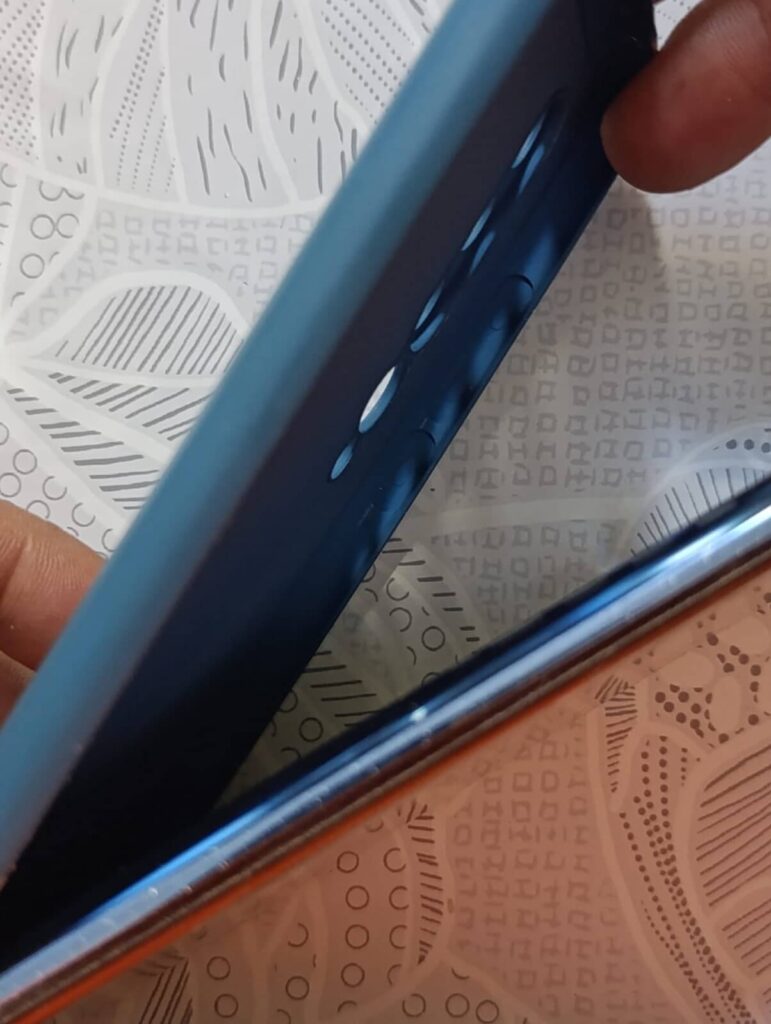
Some flexible cases can also be released by pressing through a large open camera cutout. Use this method only when the opening gives your thumb clear contact with the phone body beside the camera module. Skip it if individual lens openings, a built-in camera cover, or a separate glass lens or camera-island protector sit in the pressure path.

How to Remove a Hard, Hybrid, or Multi-Piece Case
Start with the corner or edge that has the most movement, then free the remaining fitted points one at a time without flexing the center of the back.
With a hybrid or multi-piece case, remove any separate outer frame or unlock its designated clips before lifting out the phone. Cases secured with screws, latches, or another mechanical system should be opened through that system first.
What to Do If the Phone Case Will Not Come Off
Find the point of resistance
If part of the phone has already cleared the case but another area remains fixed, inspect the section that is still captured. A fitted lip, rigid corner, clip, or fastening point may still be holding that part of the phone.
If several edges resist at the same time, check whether the case has a removable bumper, outer frame, front section, or another layer that must separate first.
Check the screen and camera protector edges
If the case lip overlaps the edge of a screen protector, separate that edge first so it is not lifted as the case releases. Also, check whether a separate lens protector or camera-island cover sits tight against the case opening. If it does, free the case edge from the protector before continuing, without forcing the case upward against it or pressing a fingernail between the two.
Check for adhesive-backed sections
A narrow frame or fitted section that does not release like the surrounding case may be held by adhesive. This is especially relevant to some foldable cases.
Treat that piece as an adhesive-backed component rather than trying to release it in the same way as a rigid corner.
Use tools only through an existing gap
Do not insert a knife, screwdriver, or other metal object between the case and phone. Once an edge is already separated, use a smooth-edged plastic tool such as a guitar pick, plastic spudger, or standard plastic card to continue separating the case along that edge without creating a new pry point.
When a Tight Case May Indicate a Phone Problem
A cracked or warped case can grip the phone unevenly, and further pulling can damage that weakened section.
If a case that previously fitted normally becomes unusually tight with no visible case damage, inspect the phone before continuing. Visible bulging, a lifting display or rear panel, or a new gap around the device frame are reasons to stop removal and follow the phone manufacturer’s service guidance.
Check the Case Before Putting It Back On
After removal, inspect the parts that control the fit: rigid corners for cracks, flexible rims for stretching, clips and fasteners for damage, and adhesive strips for lifting or wear.
Remove trapped grit or debris from the inside before reinstalling the case. A damaged retaining part can change how tightly the case fits or how easily it comes off the next time.